
Plate 01 · Android utility
TiltFlow
Tilt your phone. The page scrolls itself, only in the applications you choose. It asks you for one thing: permission to swipe on your behalf.
On an Android phone, this drawing follows the phone itself.
Notes
- Scrolling starts past 12.0° and stops again below 10.0°, so a steady hand does not flicker it on and off
- Full speed at 20.0°; between the two, speed follows the angle
- Requires Android 7.0 or later
What it does
Tilt the phone gently to one side and the page scrolls for you, so you can read one-handed without swiping. Tilt one way to move forward, the other way to go back, and return to your normal reading position to stop. The further you tilt, the faster it scrolls.
It is meant for the times swiping is inconvenient: standing on a bus with one hand on the rail, eating, holding a child. It is also for people who find repeated swiping genuinely difficult or painful rather than merely annoying.
Only where you want it
TiltFlow does nothing until you say where it should work. Tick your browser, your e-book reader, your PDF application. TiltFlow then stays completely inactive everywhere else. Open your messages or the camera and it switches itself off. Go back to reading and it comes back on, without you doing anything.
Applications appear in that list once you have opened them at least once with TiltFlow's service running. That is deliberate: it means TiltFlow never needs permission to see every application installed on your phone.
The application
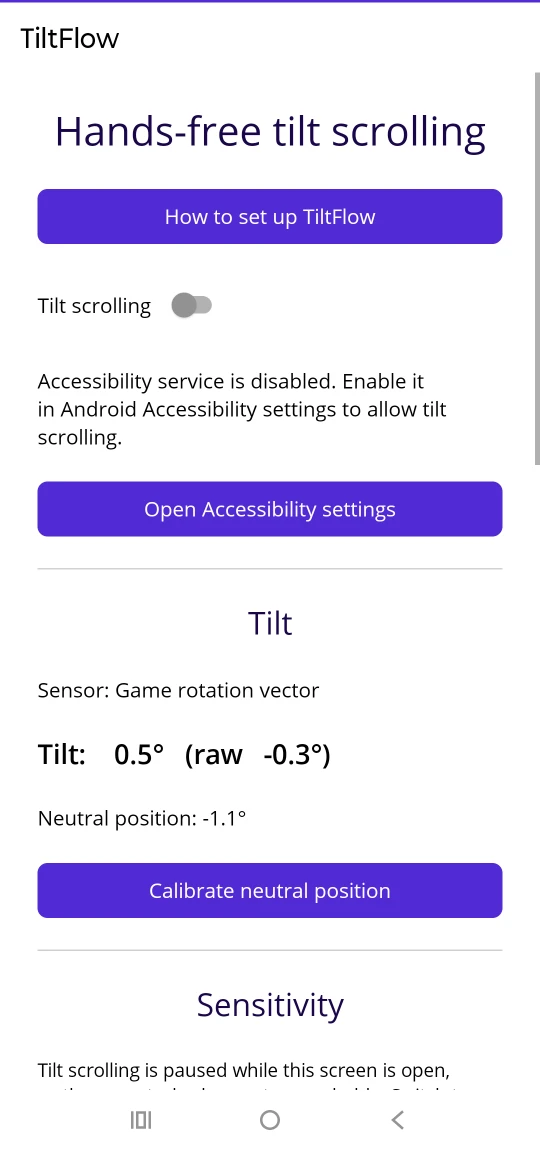
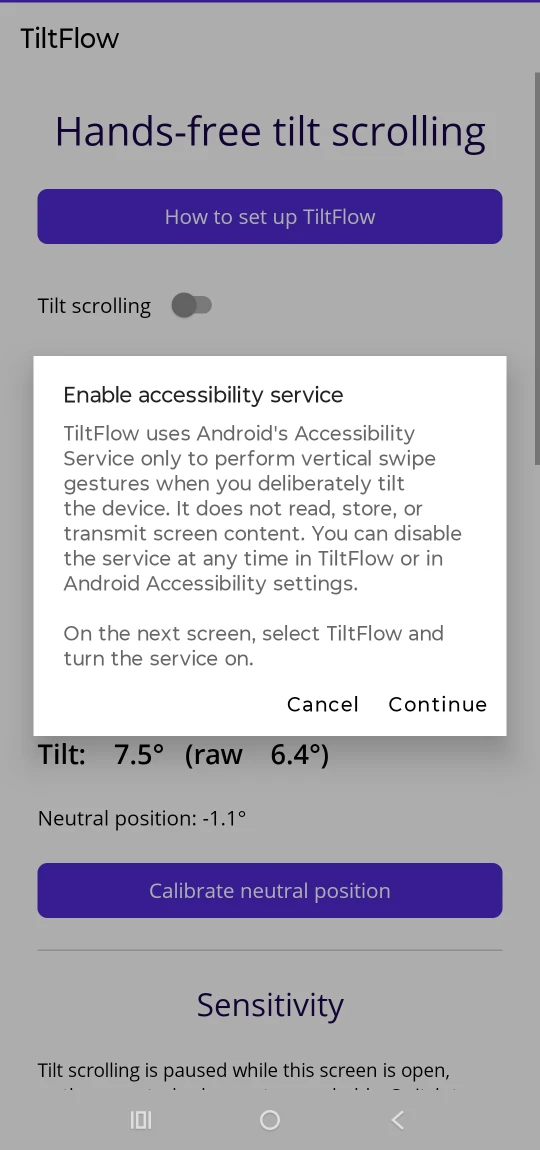
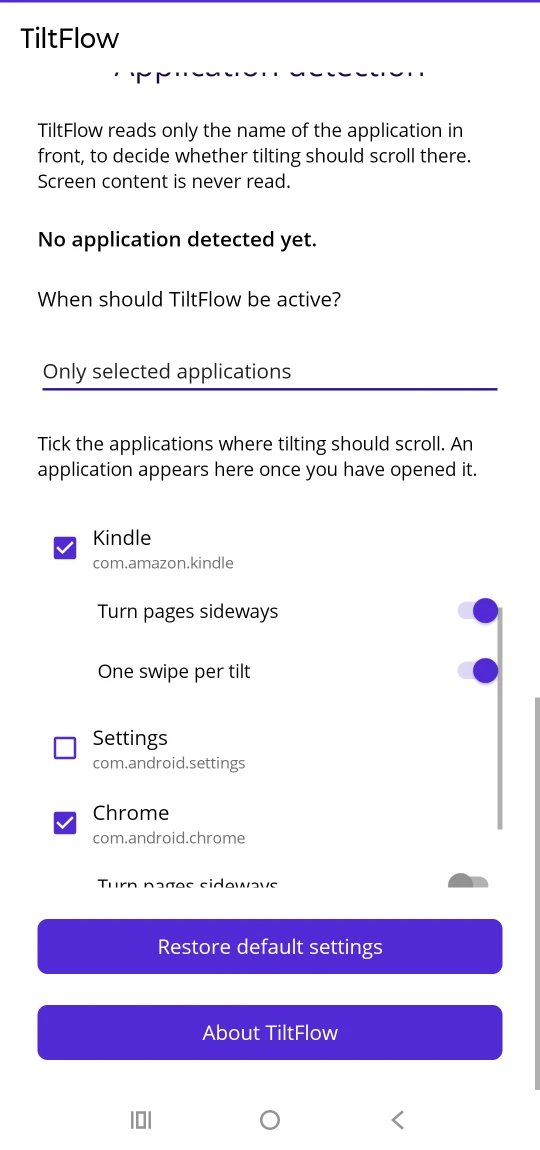
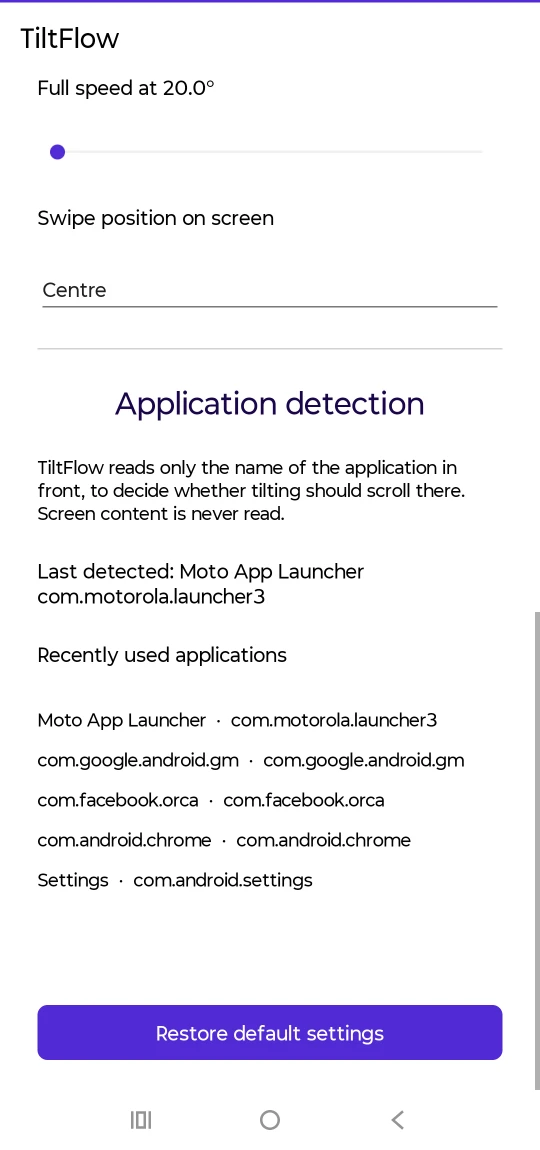
Made to fit how you read
Everyone holds a phone differently, so nothing here is fixed. These are the values the application ships with; all of them are yours to change.
| Neutral position | Calibrated by you, to however you actually hold the phone. All angles are measured from it. |
|---|---|
| Start scrolling above | 12.0°, far enough clear of ordinary hand movement that reading still holds steady. |
| Stop scrolling below | 10.0°, deliberately lower than the start angle, so a hand resting near the threshold cannot stutter it. |
| Full speed at | 20.0°. Between this and the start angle, speed follows the angle. |
| Direction | Swap which way scrolls forward, if you prefer them the other way round. |
| Swipe position | Left, centre or right, for applications that only respond in part of the screen. |
E-book readers
Readers such as Kindle turn whole pages sideways rather than scrolling. TiltFlow handles those too: enable Turn pages sideways and One swipe per tilt for that application, and one tilt turns exactly one page, however long you hold it.
The privacy claim, and how to check it
TiltFlow does ask you to grant something, and it is worth being exact about what. To swipe on your behalf it needs an accessibility service, which you switch on yourself in Android's settings. Android provides no other route for one application to scroll another, so there is no version of this product that does not ask. What matters is how much that service is allowed to do.
TiltFlow does not read the content of your screen, and cannot send anything anywhere.
Its accessibility service is declared
canRetrieveWindowContent="false" and
canPerformGestures="true": it may swipe, and Android will not give it
the contents of your screen. It is unable to read the screen rather than choosing
not to. Separately, the released build declares no Android permissions at all —
including no internet permission — so it has no route by which to transmit
anything. There is no account, no advertising and no analytics.
Both of those are properties of the application's manifest rather than assurances in a document, which means you do not have to take them on trust. Android will show you the permission list for any installed application, and TiltFlow's is empty. The accessibility service appears in Android's own Accessibility settings, and you can turn it off there at any moment without uninstalling anything.
To decide whether tilting should scroll where you are, TiltFlow compares the name of
the application in front with the list you ticked. The service subscribes to one kind
of event only, typeWindowStateChanged, which is how it learns that the
front application changed. That comparison happens on your device; the name is not
stored, not recorded and not sent anywhere. The full detail is in the
privacy policy.
How it works
The phone's motion sensor reports how far the device is rolled to one side. TiltFlow takes that angle, smooths it with a light low-pass filter (coefficient 0.15), so a bump in the road is not read as an instruction, and compares it with your thresholds. Past 12°, it asks Android to perform the same swipe your finger would.
That last step is the reason the application needs an accessibility service at all. Android only lets an application swipe on your behalf through that service; there is no other route. So TiltFlow asks for it, and explains what the service does before sending you to the settings screen rather than after.
You can turn it off at any time, in TiltFlow or in Android's Accessibility settings.
What it cannot do
TiltFlow works with applications that respond to ordinary swipe gestures. Some applications (certain games, and readers with copy protection) ignore simulated swipes and cannot be scrolled this way. No setting changes that, and it is worth knowing before you install rather than after.
If the phone is lying flat, sideways tilt cannot be measured. Hold it more upright, as you would to read.
Availability
TiltFlow is published on
Google Play, as com.hollovar.tiltflow. That listing is
the only place the application is distributed from; anything offering it elsewhere did
not come from this studio.
The first release is free, complete and ad-free. If a paid supporter option is added later it will live inside the same application, not in a separate paid one.
Compatibility reports are genuinely useful, particularly for applications that ignore simulated swipes. The support page has the address.