
Plate 02 · Windows utility
KB525C Control
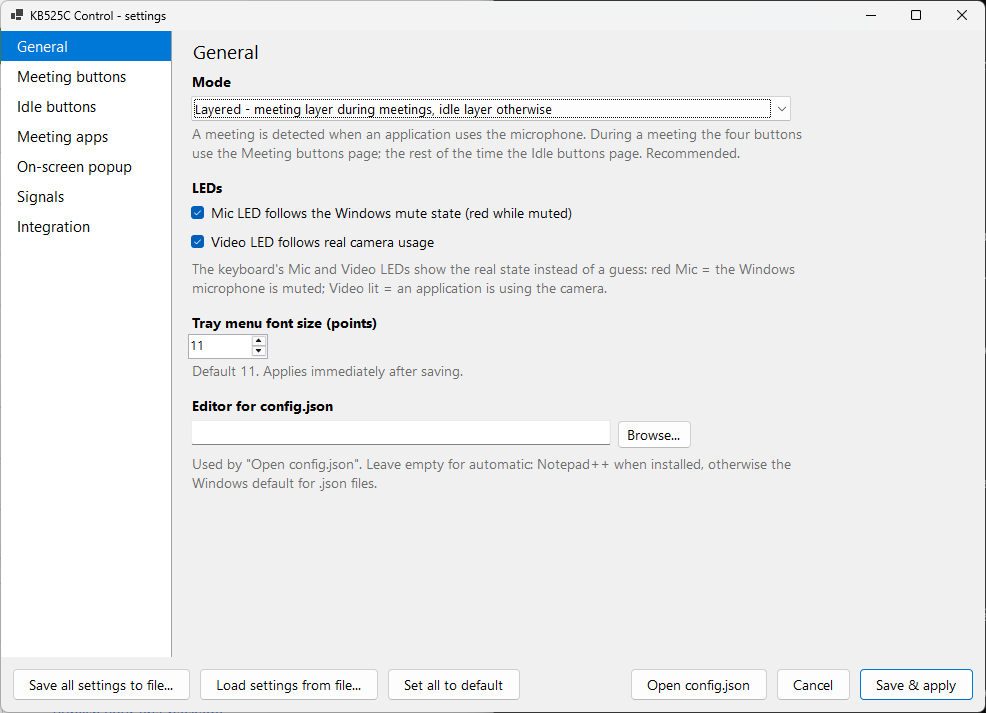
The Dell KB525C keyboard has four collaboration buttons that work only in Zoom. This makes them yours: meeting controls in any call, launchers and macros otherwise, and an LED row your scripts can signal on.
Notes
- 0 network code in the application — it talks to the keyboard and to a local named pipe, nothing else
- 2 executables: the tray application and the
kb525ccommand-line client, both self-contained - MIT licence, source on GitHub, no account and no installer beyond a PowerShell script
- Requires Windows 10 or 11 and the Dell KB525C; the Dell Peripheral Manager service has to be switched off
What it does
Out of the box the four backlit buttons above the KB525C's number pad — Video, Share, Chat and Mic — do exactly one thing: control a Zoom meeting, through Dell's own software. Anywhere else they are dark and silent; the firmware does not even report a press until something switches the buttons on.
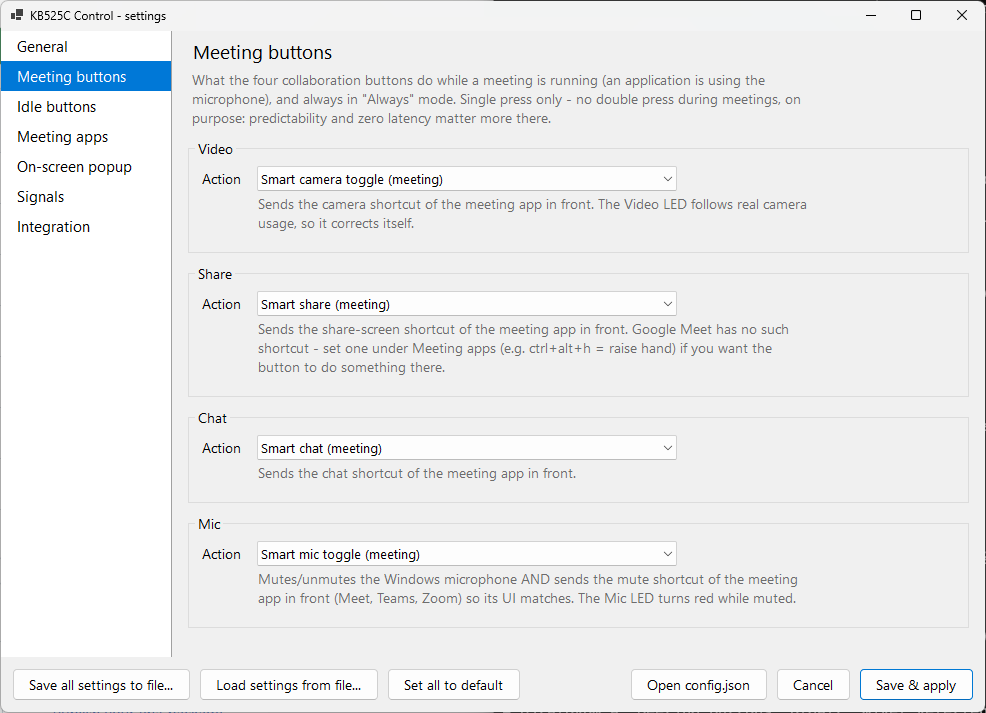
KB525C Control switches them on itself, over the keyboard's own USB interface, and then gives them two lives. In a meeting — any application using the microphone, be it Teams, Google Meet, Zoom or Discord — the buttons do what the labels say: mute, camera, share, chat, with the LEDs showing the real state. White is on, red is muted or camera off. Outside meetings the same buttons become launchers and macros. A terminal in the folder you are looking at. A calculator. Claude Code. A screenshot hotkey. Each with an optional double-press action.
The LED row is also a programmable indicator. Any script can make it blink
through the kb525c command-line client or a named pipe — "the build finished",
"Claude Code is waiting for you" — and pressing any button acknowledges the signal and can
bring the right window to the front.
Two layers, one keyboard
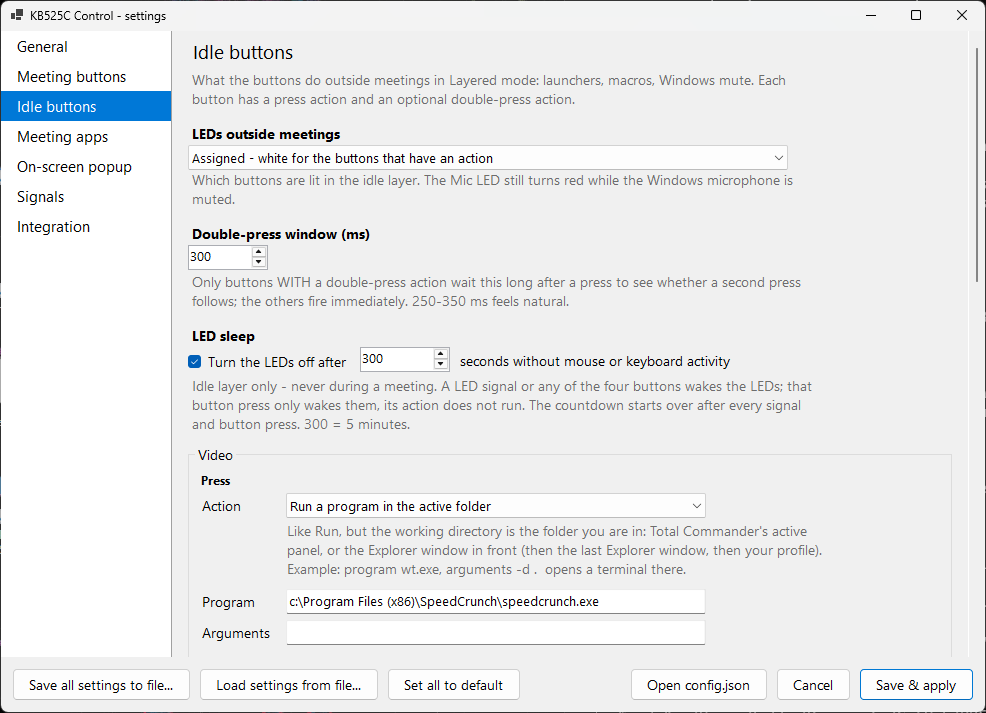
A meeting is detected by asking Windows whether anything is using the microphone; no per-application plug-ins, no window-title guessing. While something is, the buttons drive the meeting application in front, using its own keyboard shortcuts. The rest of the time they do whatever you have given them. This is the author's own idle layer:
| Mic | Toggles the Windows microphone mute. The LED goes red while muted, which is handy for Discord and the like. |
|---|---|
| Video | Opens the SpeedCrunch calculator. |
| Share | Opens Windows Terminal in the active folder — the Explorer window or Total Commander panel you are looking at. |
| Chat | Starts Claude Code in that same folder. |
After a set time without mouse or keyboard activity — five minutes by default — the idle-layer LEDs go dark. A signal or any of the four buttons wakes them — that press only wakes, it does not run the button's action — and a meeting always lights the row regardless.
Actions can be a program, a hotkey, a document or URL, a "focus this window or launch it", or a macro of keystrokes, typed text, delays and launches. Every program a button starts is told which button, which layer and which folder called it, so one script can serve several bindings.
The application
Signals from your scripts
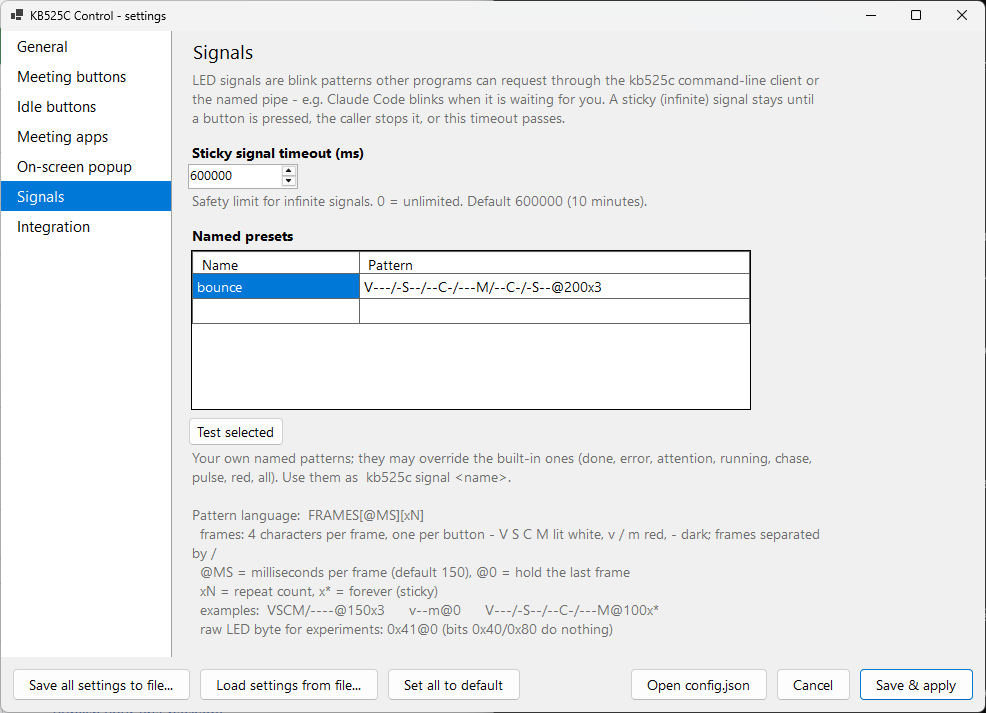
A signal is a sequence of frames the application plays on top of whatever the LEDs are showing, restoring it afterwards. A frame is four characters, one per key — upper case white, lower case red, a dash dark — and a line of them is a pattern:
VSCM/----@150x3 |
The whole row flashes three times. This is the built-in done. |
|---|---|
V---/-S--/--C-/---M/--C-/-S--@200x3 |
A light running left, right and back: bounce, the pattern the author's Claude Code hooks use. |
v--m/----@250x* |
A red alarm, forever — a sticky signal that waits until a button is pressed. |
kb525c signal bounce --sticky --ack focus:WindowsTerminal from any shell does
it; so does one line of JSON on the named pipe from PowerShell, Python or Node. Claude Code
hooks, build scripts and kb525c run -- npm test — a running light while the
command runs, then done or error by its exit code — are documented in the repository.
The privacy claim, and how to check it
KB525C Control has no network code. It cannot send anything anywhere.
The source is public and small — about five thousand lines of C# — and contains no HTTP client, no socket, no telemetry library. The application opens the keyboard's USB HID interface and a named pipe that only the logged-in user can reach. There is no account, no advertising, no analytics and no update check.
What it does read on your machine is worth being exact about, because a tool that runs your keyboard has to look at a few things. To know whether you are in a meeting it reads the flag Windows keeps on which applications currently hold the microphone and camera — a flag, not audio or video. To send the right shortcut it reads the process name and window title of the window in front. To open a terminal in the right place it reads the folder of the Explorer window or Total Commander panel in front. None of this is stored, and none of it leaves the machine. The full detail is in the privacy statement.
One honest caveat: the keyboard's command channel is held exclusively by Dell Peripheral Manager while its service runs, so the install script disables that service (it asks for administrator rights to do so, and the uninstall script can restore it). You lose the factory Zoom integration of the four buttons and firmware updates through Dell's software; ordinary keys and media keys are unaffected.
How it works
The keyboard exposes a vendor-specific USB HID interface alongside the ordinary keyboard and media interfaces. One feature report on it switches the collaboration keys on and sets the six LED bits — white for each key, red for Video and Mic — and one input report carries each press as a bitmask. The application sends the first, reads the second, and keeps the LEDs in step with the microphone, the camera and whatever signal is playing. On exit it switches the keys off again, exactly as it found them.
The protocol was worked out by watching what Dell's software sends and then confirming it from an independent program with Dell's software stopped. Only that one documented command is used. The keyboard also has a firmware-update interface; the application never touches it.
What it cannot do
Meeting shortcuts only reach the window in front. If the meeting window is behind your editor, the Mic button still mutes at the operating-system level, but the meeting application's own button does not follow. Google Meet has no screen-share shortcut at all, so that button is empty there by default. And the KB525C is the only keyboard supported — a different Dell model is reported by its identifier in the tray, not driven.
Availability
KB525C Control is published on
GitHub under the MIT
licence, as source and as a ready-built zip on the releases page. There is no installer:
unzip, run install.ps1, look for the tray icon.
Not affiliated with Dell Technologies. Dell, Zoom, Microsoft Teams and Google Meet are trademarks of their respective owners. Bug reports and pull requests go to the repository; the support page has the address for everything else.